

Every HR director knows the first 90 days matter, but working with dozens of clients, I see it rarely treated like the margin-critical window it is.
By day 90, a new hire has already decided (consciously or not!) whether they’re staying for a career or biding their time until they restart their job hunt. That means these few months are your path to protected recruitment spend, shorter time-to-productivity, and improving both retention and engagement.
All at once! There’s business value aplenty here, so let’s explore an updated playbook for leaders who need frictionless experiences that scale while not overwhelming HR teams.
Jump to a section:
- Why the first 90 days determine your retention margin
- Five retention ideas that are actually different than the standard advice
- The KPI reference table every HR director should track
- Building a 90-day strategy that scales
Why the first 90 days determine your retention margin
A successful 90-day strategy is about moving a new hire from a state of orientation to full cultural and operational alignment and doing it before they’ve mentally checked out. So let’s talk numbers, because HR offers significant business gains when invested in well, and the financial case for more resourcing around the first 90 days isn’t abstract.
The downside’s rough: replacing an employee costs up to 200% of their annual salary, a range that widens further once you account for lost productivity both in the role and from the rest of the team / management while it’s left unfilled.
And the 90-day window? Research Global’s 2025 Employee Sentiment Report found 22% of new hires leave in that window, with poor onboarding cited as a primary reason … not a cultural or job mismatch.
And when a candidate disappears after accepting an offer, a company has typically already spent 75–90% of its full cost-per-hire (recruiting fees, screening, hiring manager time, coordination) with zero return. SHRM puts the average cost-per-hire at $5,475 for non-executive roles.
So, do the math: across a high-volume hiring pipeline, 90-day retention offers massive upside … and risk.
For instance, if you hire 2,500 people a year, assuming 20% turnover, that’s 500 people you’re re-hiring for. 500 x $4,500 (assuming ~80% of SHRM’s cost-per-hire) = over $2 million in loss for the business.
For just 500 rehires!
This is why we built our preboarding platform around the assumption that retention risk starts at offer acceptance, not day one … and why the research on candidate ghosting we published continues to shape how we advise clients on this window.
Five retention ideas that are actually different than the standard advice
I’ve read it, you’ve seen it, you know it … the typical onboarding advice that ranges from “assign a mentor” to “set clear expectations.” To be fair, it isn’t wrong, but it’s also not actionable or anything that changes what you’re doing today.
These five employee onboarding tips will:
1. Structured onboarding is risk transfer
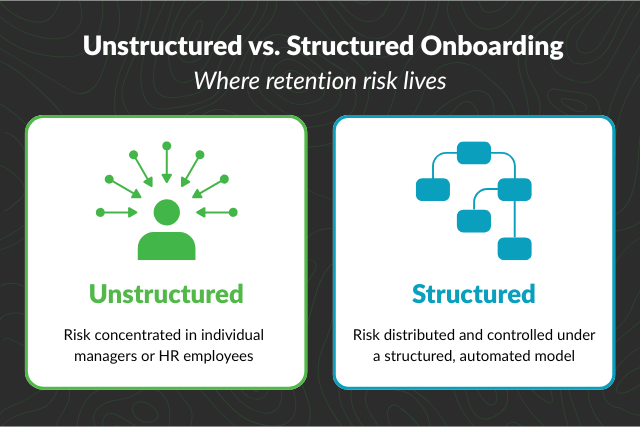
Companies with a standard onboarding process see 50% greater new hire retention, but the real value stems from its structure.
How much of this process demands an overwhelmed HR specialist chases paperwork and another verification while the hiring manager’s capacity to show up organized and engaged throughout determines success? That’s two variables that can go wrong in a hurry.
A more structured process transfers that risk away from any single person and into a system that performs the same way every time, for every new hire, regardless of manager, department, or location. Audit your current 90-day process today and ask: what’s dependent on a person remembering to do something? (And by “remember” that covers any checklist or to-do that’s used)
Every dependency is risk to retention.
2. Tool access is productivity, not training
New hires who struggle in their first 90 days often don’t have frictionless access to what they need: system credentials that arrive late, unclear “what to do” processes when something breaks, etc.
Adam Wachtel, our CTO, has seen this pattern directly in client environments: “The cost of turnover is very much quantifiable, and there’s a correlation between high turnover and a disjointed onboarding process. This shows up even more in industries like healthcare or retail, which are so revenue-driven.”
Friction = risk. If you take nothing else from this article, focus on this truth! Every credential, tool, and piece of role-specific information a new hire needs should be provisioned and confirmed before their first task requires it vs. being requested once they hit a wall.
3. Engagement and retention are the same conversation
Most organizations treat “engagement” and “retention” as separate goals with different teams accountable for them, but I’ll argue that split is a cultural mistake.
Engagement in the first 90 days is the leading indicator while retention is the lagging one. By the time a retention number moves, the engagement signal that predicted it has been visible for weeks. Good enough isn’t good enough.
So, what to do? Track engagement signals (i.e. brief pulse survey responses, manager check-in completion, tool usage – which IT can help with) with the same rigor you track 90-day retention. Make it a weekly KPI so that if engagement trends down, you can act before it’s too late.
4. Feedback loops … only if outcomes are clear
Collecting feedback from new hires is table stakes; you’ve probably already running some version of a 30- or 60-day survey.
What separates high-performing organizations is what happens after the survey … if feedback consistently surfaces the same issue, such as a confusing handoff between recruiting and HR, and nothing changes, the survey becomes a formality that damages trust rather than building it.
Employee notice when their feedback isn’t used.
So, use it! Set up an automated feedback loop specifically for early departures, not just active new hires. If someone exits within the first 90 days, a short, structured survey on why during their offboarding can surface patterns in your preboarding or onboarding process you’d otherwise never know.
Identify the theme, then fix the process – don’t assume it’s a one-off case.
5. Career visibility in week one
New hires who don’t see a path forward may start looking for one elsewhere.
That’s a retention risk hiding in plain sight, particularly for new hires who may have other options.
It’s okay to manage expectations – there may not be a promotion coming in 12-18 months, but you can set clear goals and show where there is growth potential. Mapping out what that path looks like, even informally with 30-day check-ins, reframes the employer-new hire relationship to “grow with us!” instead of “prove yourself, now.”
The KPI reference table every HR director should track
Generic KPI lists tell you what to measure but rarely what a good number actually looks like for your specific workforce. A number without context is more friction, and remember: friction = risk.
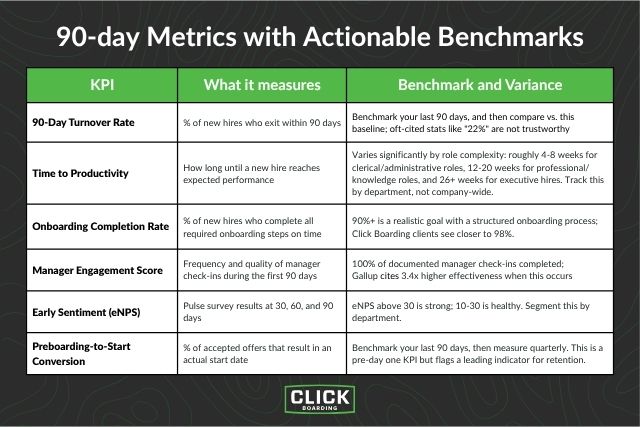
The table below breaks down the core 90-day metrics with actionable benchmarks, and where they diverge by candidate type, department, and seniority – you can also get this as a downloadable graphic to share with a colleague.
| KPI | What It Measures | Benchmark and Variance |
| 90-Day Turnover Rate | % of new hires who exit within 90 days | Benchmark your last 90 days, and then compare vs. this baseline; oft-cited stats like “22%” are not trustworthy |
| Time to Productivity | How long until a new hire reaches expected performance | Varies significantly by role complexity: roughly 4-8 weeks for clerical/administrative roles, 12-20 weeks for professional/knowledge roles, and 26+ weeks for executive hires. Track this by department. |
| Onboarding Completion Rate | % of new hires who complete all required onboarding steps on time | 90%+ is a realistic goal with a structured onboarding process; Click Boarding clients see closer to 98%. |
| Manager Engagement Score | Frequency and quality of manager check-ins during the first 90 days | 100% of documented manager check-ins completed; Gallup cites 3.4x higher effectiveness when this occurs |
| Early Sentiment (eNPS) | Pulse survey results at 30, 60, and 90 days | eNPS above 30 is strong; 10-30 is healthy. Segment this by department. |
| Preboarding-to-start Conversion | % of accepted offers that result in an actual start date | Benchmark your last 90 days, then measure quarterly. This is a pre-day one KPI but flags a leading indicator for retention. |
90-day turnover rate and onboarding completion rate are ones I frequently see, though they’re often the only ones!
If you aren’t tracking any, start with retention rate, but don’t stop there … the other five are leading indicators that would have surfaced a retention problem weeks before it became a churn statistic, so now’s a great time to revisit your reporting and how you act upon that data.
Building a 90-day strategy that scales
None of the insights or KPIs above matter if your organization can’t execute them consistently across every manager, department, office arrangement, location, and role. If I’m honest, this is where most 90-day strategies actually break down!
A retention strategy that depends on individual managers remembering to run check-ins, or HR coordinators remembering to send the right document at the right time, is hope.
Cue the age-old adage: hope isn’t a strategy.
One practical step? Moving to automated employee onboarding workflows that execute the same way every time so HR and managers are free to spend their time on the parts of the 90-day window a platform can’t replace: actual relationship-building.
And if nearly half of all candidate ghosting happens between offer acceptance and day one, your 90-day clock really starts the moment a candidate accepts the offer – not day one! And so employee preboarding, with more automation involved, pairs nicely with onboarding to create a best-in-class experience.
The math is straightforward, even if the execution requires real investment: structured, automated 90-day programs consistently outperform ad hoc ones on retention, time-to-productivity, and cost-per-hire recovery.
Friction = risk.
And now, you know how to remove that risk while driving better business outcomes … not just 90-day retention.