


If you’ve worked in staffing for any amount of time, you’ve felt this: you work hard to source a candidate, get them to interview, you get the “yes” and breathe a sigh of relief …
…and then nothing happens.
They don’t show up. They stop responding. They disappear, leaving you and your client in the lurch.
This is called ghosting, and it isn’t new, but it’s especially painful for staffing agencies because of the volume, speed, and expectations from clients. In my experience, which includes working in-house as a staffing recruiter, one of the biggest drivers of ghosting isn’t always the candidate.
It’s the gap between placement and start date!
One-sided communication (or a lack of it) leads to candidates losing confidence. Enough doubt, and they’ll disappear. We call this the Valley of Uncertainty here at Click Boarding, and this is where effective preboarding shines.
Related: we’re a top onboarding and offboarding platform for staffing agencies
The importance of speed and clarity in preboarding communication
Staffing’s wildly different from traditional HR. For instance, time isn’t a luxury; candidates aren’t spending three weeks evaluating a company’s culture. They’re trying to find work, you’re playing matchmaker, and fast.
So candidates asking much more practical questions like “when can I start?” and “how soon will I get paid?”
Clear, fast answers build credibility.
I work with staffing agencies today, and this hasn’t changed from when I was on your side: if you have interest, striking while the iron is hot is everything.
In sales, time kills all deals. That’s the same with filling a staffing need … any delay brings risk at filling the role. So the more steps you ask them to take or more manual processes you have to work through, the greater chance your ideal candidate bails.
Effective preboarding enables direct, simple, and immediate communication so you get them to day one and finish your job (so they start theirs).
Removing ambiguity = a strong communication timeline
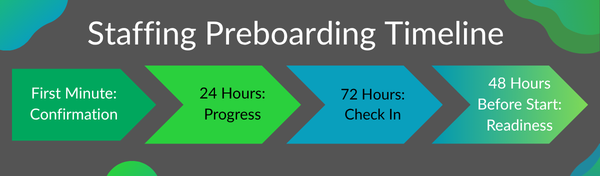 This starts the moment a candidate accepts an offer. Yes, the moment.
It’s building on the high of them saying “yes” and immediately answering the question “now what?”
Here’s a simple model I recommend based on what I’ve seen work. One caveat: you may want to adjust timing based on how quickly new hires start with a particular client:
Minute one: Immediate confirmation
Yes, I mean minute. No delay at all! As soon as a candidate accepts:
- confirm the job details (role, pay, start date, location)
- provide next steps clearly
- give them access to required documents immediately
This is about reinforcing “You’ve made the right choice!” It might be by phone, text, or email, but instant communication builds trust.
Within 24 hours: Progress + reassurance
Your process should do this automatically.
Send a confirmation of what’s already completed, remind your candidate of the next steps, and let them know who to reach out to if they have questions.
This is where I see a lot of breakdown – many staffing companies still rely on recruiters to handle this all manually. Manual invites delays, delays = risk!
When this is setup well, it’s nearly impossible to mess up. A good platform helps here, well-integrated with your ATS and other systems.
72 hours later: a quick check in
A short note asking “hey, making sure you have everything – do you have any questions? Reply if you do, here to help!” does wonders in keeping your candidates feeling supported.
Plus, if they have run into any trouble, now’s your chance to jump in before their planned start date.
48 hours before start: Final readiness check
At this stage, it’s about closing the loop and reassuring one more time. Candidates should feel “hey, we’re expecting you, and we’re ready, and we’re excited!”
Give them start date, location, arrival instructions, note any documents they need, and make sure their primary point of contact is listed with the client.
Better employee engagement prevents ghosting
Ghosting happens when certainty disappears. Preboarding reinforces certainty at every step.
So keep these concepts in mind when approaching your ideal preboarding buildout:
- Reduce friction. Explained above in my ideal comms plan – friction = delays.
- Focus on mobility. Many candidates handle this all on their phones, and that’s a market expectation. If your processes demand a laptop or them to come into your office, that’s a huge roadblock that invites delays (or drop rates)
- Always identify their point of contact. It lets them know “I’m here for you” while reinforcing the commitment runs both ways
Here’s Your Staffing Agency Preboarding Communications Checklist
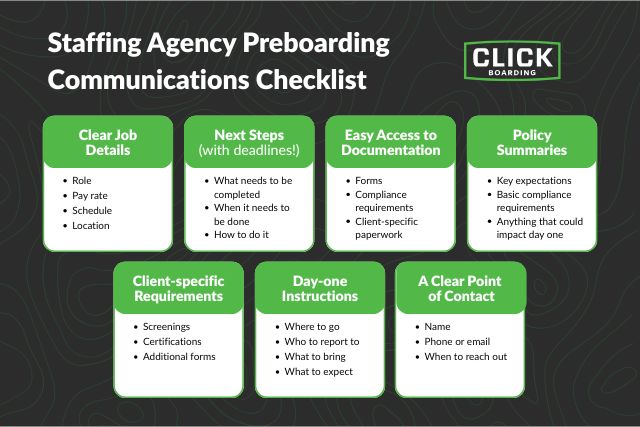 Ready to take action? Simplify your communication strategy by focusing on these steps – every preboarding communication should include:
Clear job details
- role
- pay rate
- schedule
- location
Next steps (with deadlines)
- what needs to be completed
- when it needs to be done
- how to do it
Easy access to documentation
- forms
- compliance requirements
- client-specific paperwork
Ideally all in one place, not spread across emails.
Policy summaries
- key expectations
- basic compliance requirements
- anything that could impact day one
Client-specific requirements
- screenings
- certifications
- additional forms
These are often where delays happen if not communicated early.
Day-one instructions
- where to go
- who to report to
- what to bring
- what to expect
A clear point of contact
- name
- phone or email
- when to reach out
Friendly reminder: you’re aiming to remove uncertainty.
Secure your talent before they start
If there’s one thing I learned working in and with staffing, it’s that getting a “yes” from a candidate is only half the job.
You feel this everyday! Having them show up comes down to how you manage time between acceptance and start date.
Any process that’s slow, unclear, or repetitive adds friction and leads to lost candidates.
Employee preboarding isn’t just about getting paperwork done, but maintaining momentum and reinforcing trust at every step so your candidate shows. Get this right, and you do more than reduce no-shows … you create a better experience for everyone: candidates, recruiters, and your clients!