


Preboarding is everything that happens between offer acceptance and a new hire’s first day … it’s pre-onboarding for your new employee.
And it continues to be the phase most organizations underinvest in, despite evidence showing this is where the first signs of disengagement, ghosting, and early churn tend to appear!
The gap between “yes, I’ll take the job” and Day 1 can span days or weeks. New hires are still forming impressions, fielding competing offers, and deciding whether they made the right choice. Ghosting, where a new hire never shows up, continues to be a growing trend for employers. Instead of throwing up your hands and complaining about how the market’s changes, there’s a way to immediately fix the issue: preboarding that’s structured, filled with intentional communication, and making a new hire feel welcomed and prepared.
This checklist breaks down employee preboarding best practices into three actionable phases, with guidance on what to complete, why it matters, and how automation can help HR teams deliver a consistent experience every time.
Want the full checklist? Download a PDF version that’s ready to adapt and use across your organization.
Why preboarding is critical to retention
The preboarding window is uniquely high-stakes because new hires are simultaneously excited and uncertain. They’ve said yes, but they haven’t yet experienced the reality of working for you.
What fills that gap (or doesn’t!) shapes how committed they feel before they’ve even started.
Three things matter most during this phase: clarity, connection, and confidence. Clarity means the new hire knows exactly what to expect: what they need to complete, when they start, what Day 1 looks like. Connection means they’ve had at least one human touchpoint that makes them feel genuinely welcomed. Confidence means they have what they need to show up read, including emotional confidence they made the right choice.
When any of these are missing, the risk of ghosting and early churn rises. One in four millennials and Gen Z workers admit to ghosting an employer without giving notice or explanation, according to the Thriving Center of Psychology. And nearly 30% of new hires depart within their first 90 days, many citing a lack of support and clarity in the early stages as a contributing factor.
Preboarding is one of the most controllable phases of the employee lifecycle; with the right process in place, HR teams can eliminate most of the uncertainty that drives early disengagement before the new hire ever walks through the door.
Related: Why employee retention starts before their first day
Your comprehensive employee preboarding checklist
A strong preboarding process shouldn’t require weeks of manual coordination – it SHOULD be the right steps, in the right order, delivered consistently to every new hire.
Get the full checklist here as a PDF to take with you!
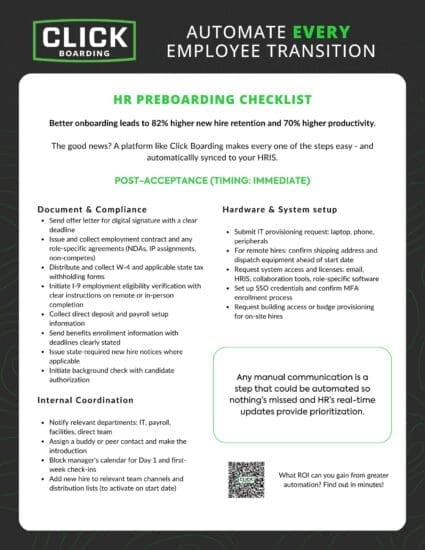
This checklist below is organized into three phases: post-acceptance, seven days before start, and 48 hours before Day 1.
Phase 1: Post-acceptance
Timing: Immediately after offer acceptance
This phase is about getting the administrative and operational foundations in place while the new hire’s enthusiasm is at its highest. Speed matters here: a long silence after offer acceptance is one of the most common triggers for second-guessing.
Documentation and compliance
- Send offer letter for digital signature with a clear deadline
- Issue and collect employment contract and any role-specific agreements (NDAs, IP assignments, non-competes)
- Distribute and collect W-4 and applicable state tax withholding forms
- Initiate I-9 employment eligibility verification with clear instructions on remote or in-person completion
- Collect direct deposit and payroll setup information
- Send benefits enrollment information with deadlines clearly stated
- Issue state-required new hire notices where applicable
- Initiate background check with candidate authorization
Hardware and systems setup
- Submit IT provisioning request: laptop, phone, peripherals
- For remote hires: confirm shipping address and dispatch equipment ahead of start date
- Request system access and licenses: email, HRIS, collaboration tools, role-specific software
- Set up SSO credentials and confirm MFA enrollment process
- Request building access or badge provisioning for on-site hires
Internal coordination
- Notify relevant departments: IT, payroll, facilities, direct team
- Assign a buddy or peer contact and make the introduction
- Block manager’s calendar for Day 1 and first-week check-ins
- Add new hire to relevant team channels and distribution lists (to activate on start date)
I said speed matters, I see this phase handled inconsistently more than any other. For instance, HR initiates paperwork but IT doesn’t get the provisioning request until a few days before Day 1, and the new hire’s first experience is waiting for a laptop that hasn’t arrived or getting logins sent over ad-hoc.
Building these internal notifications directly into the preboarding workflow (and with real-time tracking) so they trigger automatically when an offer is accepted removes this failure point without adding more effort.
Phase 2: Seven days before start
Timing: One week out
With compliance and setup in motion, your focus shifts to culture and connection. This is where preboarding moves from a checklist to building trust … from transactional to relational. It’s honestly the most-impactful part related to early retention because it’s where your new hire’s feeling how their everyday will feel.
So … make the most of it! Here’s how:
Welcome communications
- Send a personalized welcome email or video from the direct manager
- Share a welcome message from the broader team or a senior leader
- Introduce the buddy or peer contact with a brief personal note
- Send a digital welcome pack: company story, mission and values, team structure
Cultural orientation
- Share the employee handbook digitally with a completion confirmation step
- Provide an overview of communication norms: which tools the team uses, when meetings happen, how people prefer to work
- Share any relevant team rituals, traditions, or informal context that helps new hires feel like insiders before they start
- For on-site or hybrid hires: share office layout, parking information, and any access codes or building procedures
Role preparation
- Send a brief pre-read or overview of the team’s current priorities
- Introduce any tools or systems the new hire will use on Day 1 with login confirmation
- Confirm training schedule for the first two weeks
When you onboard somebody into the business and you do it well, your employees will want to stay and do their best work with your company. The difference usually comes down to personalization: does the welcome feel like it was written for this specific person, or does it feel like a templated exercise that’s just another to-do on someone’s list?
Again, though, it’s about scale. Can your onboarding module or current process give you the flexibility to make these minor upgrades but in a way that doesn’t add hours to HR’s day?
Related: Nine Preboarding Strategies for a Positive Employee Journey
Phase 3: 48 hours before Day 1
This is your final confirmation window, removing any final areas that’re making your new hire uncertain and letting them arrive with confidence.
Remember, this emotional state shapes their entire first-week experience!
Logistics confirmation
- Send a confirmed Day 1 agenda: times, locations, video call links where applicable
- For on-site hires: confirm parking, building entry, reception instructions, and who will greet them
- For remote hires: confirm all system access is active, equipment has arrived and is functional, and video call links for all Day 1 meetings are ready
- For hybrid hires: specify which days are in-office during the first week and what to expect on each
- Confirm the buddy contact has been briefed and will be available on Day 1
Administrative confirmation
- Verify all compliance documentation has been completed and collected
- Confirm payroll setup is complete and direct deposit is active
- Confirm background check status and flag any outstanding items to HR
- Verify all system access and equipment is ready to use from minute one
Final welcome touchpoint
- Send a brief, warm “see you soon” message from the manager … it’s not a reminder, this should feel like a welcome
- Include a single point of contact for any last-minute questions or issues (and where to find them, if on-site or hybrid)
- Reiterate excitement about their joining, use an exclamation mark or two! This is their last impression before Day 1
The 48-hour window is when new hires are most likely to experience pre-start nerves … a warm, specific message from their manager (NOT a system notification, that’s too transactional) goes a long way toward converting excitement into confidence.
Related: Essential preboarding tasks to prevent candidate ghosting
Balancing remote, hybrid, and on-site preboarding
Remember, your preboarding process has to scale across all three working arrangements – the fundamentals shouldn’t change by location or type. Every new hire needs clarity, connection, and operational readiness before they start … you know this, of course!
How you make it happen is your chance to shine:
For on-site hires, logistics are physical: building access, parking, a desk that’s ready, a name at reception who knows to expect them.
Biggest risk: assuming these things will be handled once you get an email confirmation, and then discovering on Day 1 a badge hasn’t been issued or the desk hasn’t been set up. Another manual process to track down = unmitigated risk.
For remote hires, logistics are digital: equipment shipped and confirmed, system access active, video call links tested.
Biggest risk: equipment arriving late or system access not being ready leaving a new hire on their first morning with nothing to do and no way to reach anyone.
This is where IT provisioning timelines need to be built into the preboarding workflow with enough lead time to catch and resolve issues before they become Day 1 problems.
Hybrid hires need both plus explicit communication about what the first week looks like: which days are in-office, what the expectation is around attendance, and how the team typically operates.
Biggest risk: without clarity, hybrid new hires can feel like they’re guessing (the opposite of the confidence you’re aiming to build.)
If you learn nothing else, it’s consistency – your preboarding experience should feel similar for every new hire without exception.
Automation is what makes this consistency achievable across hundreds or thousands of onboards provided your have separate workflows for each arrangement, each configured to deliver the right steps to the right person at the right time, without HR manually managing the variation.
And no matter if you’re staffing, healthcare, manufacturing, retail, or in any other sector with high onboarding/offboarding needs, the truth remains that consistent, scalable process is a real competitive advantage.
Having an automated preboarding tool brings major benefits
After all, a preboarding checklist is only as good as your process behind it! And if you’re doing this manually today (whether using your onboarding module or without a system at all), you’re running into waste … specifically, time.
If time is money, you’re wasting HR resources to your businesses’ detriment, just as one Fortune 100 found it was $400K.
You feel this everyday: manual processes aren’t sustainable! Something always falls through the cracks and you’re having to chase a fix: an IT request that didn’t go out, a welcome email that bounced because of a typo in the recipient’s address, a compliance form that came back incomplete, or even the sheer volume of 50 new hires needing something today.
Oh, and don’t forget about updating those tax forms or double-check I-9 verification documents.
You become managed by your process vs. managing it, and that’s no way for HR to function.
Better automation turns checklists into a linear workflow with automated next-steps and linear paths so candidates can’t stray. When an offer is accepted, the right steps trigger automatically: documents route for signature, notifications go to IT and payroll, welcome communications deploy on schedule, and compliance items are tracked in real-time so you know if anything stalls.
Nothing waits for someone to remember it!
Bonus: you aren’t spending time updating forms, sending information to another system (like an HRIS), or feeling like you’re getting nothing done.
I love what Angel Newbern, who you may have seen in a demo on our Youtube channel (or across our site!), says: “we’re in this business is to make sure employees will stay at the company and feel welcomed. You want to make sure that the talent you’re winning, you get to keep. Just having those engagement pieces and paying attention to details helps keep your new hires at the company.”
I’ve seen plenty of HR teams broken out into very specialized functions, and the left hand isn’t talking to the right; where we come in and show expertise is that our product covers the full employee lifecycle and we can help support other teams in HR besides just preboarding.
Feel overwhelmed? Don’t! Take it one step at a time: start in the area where you feel most overwhelmed and then once that’s handled, start building similar automations in other transitions.
One tip: make sure you test any process from the candidate’s point of view. Put yourself in their shoes … it might flag a phrase or step that needs a minor adjustment to reduce confusion!
Improve preboarding for your HR team with Click Boarding
A good preboarding checklist becomes a living process that needs to flex for different roles, locations, and working arrangements while delivering consistent, compliant, and on-brand experiences to every new hire, every time.
The checklist above gives you the framework. But the difference between a checklist and a process is automation.
Our preboarding platform lets HR teams build configurable workflows for every new hire type, deploy branded communications on schedule, track compliance completion in real time, and give managers visibility into where each new hire stands without manually coordinating every step.
If you’re ready to stop leaving first impressions to chance and start improving retention, no-show rates, and how you feel at the end of each workweek … we’re here.